
Android · v1.6.1
Measure It.
Measure real-world objects with your camera — instantly.
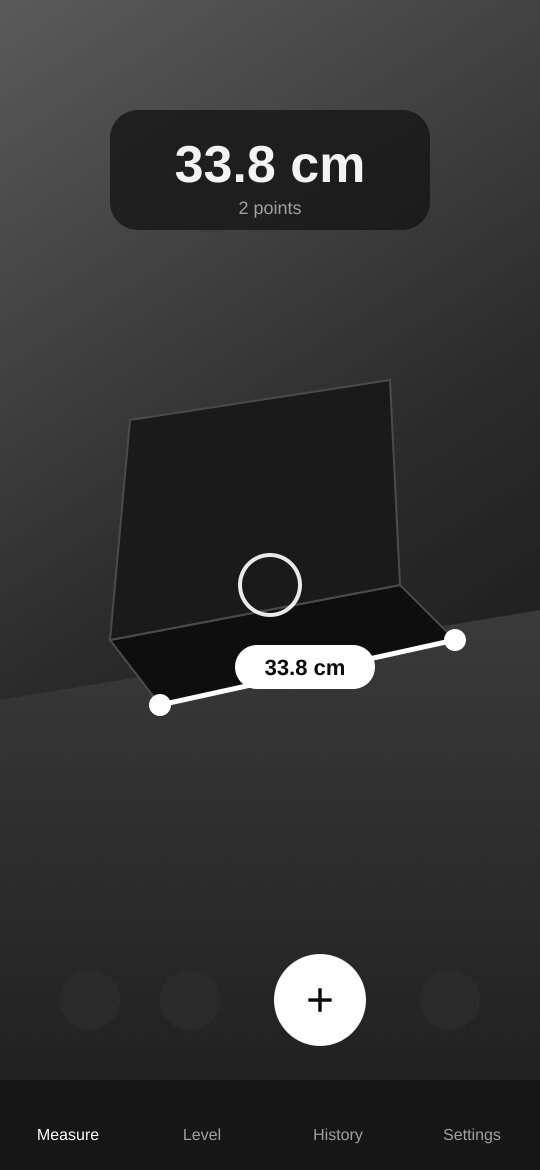
Point your phone, tap to drop points on any surface, and see precise lengths in augmented reality. Includes a bubble level, every unit you need, and a history with photos of each measurement.
Features
Everything you need. Nothing you don't.
01
AR measuring
Tap to place points on any surface and see lengths live, Apple Measure-style.
02
Locked points
Points lock in place with depth-filtered placement so they don't drift.
03
Bubble level
Flat bubble level and edge horizon level, with haptics and custom zero.
04
8 unit options
mm, cm, m, inches with fractions, feet & inches, decimal feet and yards.
05
Photo history
Save every segment, point and an annotated photo of each measurement.
06
No ads, no tracking
Completely free and ad-free. Your measurements never leave your phone.
About this app
How it works.
Measure It turns your Android phone into a tape measure using augmented reality (ARCore).
How to measure
- Open the app and move your phone slowly for a second so it can map the room.
- Aim the crosshair at one end of the object and tap +.
- Move to the other end — a live line follows with the length in the middle — and tap + again.
- Keep adding points to measure around corners, or snap back to the first point to close a shape.
Save everything
Saving keeps every segment, the total, every point and an optional photo of the AR view with the measurements drawn on it — so you can check them later.
Level
Lay the phone flat for a bubble level, or hold it on its edge for a horizon line. The screen turns green at exactly 0°, and you can tap to zero it against any surface.
FAQ
Good questions.
Is Measure It really free?+
Yes. There are no ads and nothing to unlock. You can leave an optional tip in the app if you'd like to support development.
Which phones are supported?+
Android phones that support Google Play Services for AR (ARCore). Most phones from the last several years do.
How accurate is it?+
Typically within 1–2 cm on textured surfaces in good light. Plain, dark or shiny surfaces are harder for the camera to track.
Why do I check out for a free app?+
Checkout adds the app to your library so you can re-download it and get updates anytime from any device.